
It happened in a split second. You spilled coffee on your iPad, dropped it in the pool, or got caught in unexpected rain. Now your iPad is wet, and panic is setting in. Can your iPad be saved? The answer is maybe, but you need to act fast. Water damage is one of the most serious iPad problems, but professional repair can often save your device if you seek help immediately.
We successfully restore countless water damaged iPads that owners thought were lost forever. In this comprehensive guide, we will explain what happens when your iPad gets wet, what you should do immediately, and how professional water damage repair can save your valuable device.
Understanding Water Damage and Your iPad
When water enters your iPad, it does not instantly destroy it. However, water conducts electricity, and electronics do not mix well with moisture. Here is what happens when your iPad gets wet.
The moment water enters your iPad, it can cause short circuits if the device is powered on. Water creates electrical pathways that should not exist, potentially damaging the motherboard, battery, and other critical components instantly.
Within minutes to hours, corrosion begins on circuit boards and metal components. This corrosion spreads quickly, damaging more parts as time passes. Mineral deposits from tap water accelerate corrosion significantly.
Even if your iPad seems fine initially, hidden water damage can manifest weeks or months later. Components might fail unexpectedly, or your iPad might develop intermittent issues that are difficult to diagnose.
This is why searching for professional iPad repair immediately after water damage is crucial. The faster you get professional help, the better your iPad's chances of survival.
What to Do Immediately After Water Damage
If your iPad gets wet, follow these steps while waiting to visit a professional repair shop.
Turn it off immediately. If your iPad is still on, turn it off right away. Do not try to use it or check if it works. Continued operation increases the risk of short circuits and permanent damage.
Remove external accessories. Take off any cases, screen protectors, charging cables, and any external attachments. These trap moisture and prevent proper drying.
Dry the exterior. Use a soft, lint free cloth to gently dry the outside of your iPad. Do not use heat sources like hair dryers, as excessive heat can damage internal components and force moisture deeper inside.
Do not use rice. Putting your iPad in rice is ineffective and can leave dust and debris inside your device. Professional drying methods are far superior to rice.
Avoid charging. Do not attempt to charge your iPad. Attempting to charge can cause electrical short circuits and make the damage worse significantly.
Get professional help immediately. Visit a professional repair shop offering iPad water damage repair. At TechFix.ae, we offer emergency water damage assessment and repair services. The sooner you arrive, the better your chances of recovery.
Do not wait for several days hoping the iPad will dry out on its own. Every hour that passes allows more corrosion to develop internally.
Can Water Damaged iPads Be Saved
The honest answer depends on several factors.
Type of water matters significantly. Freshwater like tap water or rainwater is less damaging than saltwater or dirty water. Saltwater corrodes components much faster, while dirty water introduces contaminants that cause additional damage.
Duration submerged is critical. An iPad left in water for 30 seconds has better survival chances than one submerged for 30 minutes. However, even brief water exposure requires professional attention.
iPad model affects recovery chances. Some newer iPads have water resistance ratings, meaning they can survive brief water exposure. Older iPads without water resistance are more vulnerable to damage.
Immediate action is essential. iPads that are dried and professionally inspected within the first few hours have significantly higher recovery rates than those left sitting wet for days.
Type of damage matters greatly. Surface water damage is often fixable. However, if water reached the motherboard or battery, the situation becomes more serious and complex.
At TechFix.ae, we have successfully restored iPads with water damage that many people thought were beyond repair. Our technicians use specialized drying equipment and cleaning solutions to remove moisture and corrosion safely.
Professional Water Damage Repair Process
When you bring your water damaged iPad to a reputable repair shop, here is what happens.
Initial assessment occurs first. Technicians examine your iPad without powering it on. They use specialized equipment to detect moisture inside the device and assess the extent of damage.
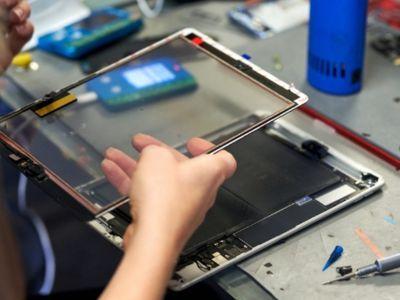
Disassembly comes next. The iPad is carefully disassembled. Each component is separated safely to allow thorough inspection and drying.
Moisture removal is performed using professional grade drying equipment. This might involve ultrasonic cleaning baths that safely remove corrosion without damaging delicate parts. These specialized machines are far more effective than DIY drying methods.
Component inspection happens carefully. Technicians inspect each component for damage or corrosion. Any corroded parts are cleaned using specialized solutions that remove oxidation safely.
Parts replacement occurs if necessary. If components are damaged beyond repair, they are replaced with quality parts. This might include the charging port, battery, or other damaged elements.
Reassembly and testing follows. Once everything is dry and repaired, the iPad is reassembled and tested thoroughly. Technicians ensure all functions work correctly before returning the device to you.
Final quality check is performed. Before you receive your iPad, it undergoes comprehensive quality checking to ensure water damage is completely resolved and no issues remain.
This professional approach gives your water damaged iPad the best chance of full recovery.
Signs Your iPad Might Be Beyond Repair
While many water damaged iPads can be saved, some are damaged beyond practical repair. Signs include the following.
Complete refusal to power on even after drying indicates serious motherboard damage. Extensive corrosion visible on the motherboard suggests widespread component failure. Multiple components showing severe damage indicates extensive water penetration. Battery swelling or physical deformation shows battery failure. Water damage to the display causing permanent discoloration suggests display panel failure that requires replacement.
Even in these cases, professional technicians can assess whether repair is possible or if component replacement is necessary. Sometimes it is more economical to replace the iPad, but professionals can guide you through this decision.
Prevention Tips to Protect Your iPad
The best approach to water damage is prevention. Here are practical steps to protect your device.
Use a waterproof case. Quality waterproof cases protect your iPad from accidental splashes and brief submersion. They are inexpensive insurance for your valuable device.
Avoid using your iPad near water. Keep your iPad away from pools, bathtubs, and sinks. Many water damage incidents happen because people use their iPad in water prone areas.
Check weather conditions. Before heading out in rain, place your iPad in a waterproof pouch or bag for protection.
Be careful with beverages. Drinks are a common cause of water damage. Keep your iPad away from cups and bottles.
Dry your hands before using. Wet hands do not cause water damage directly, but they increase the risk of dropping your iPad into water.
Invest in water resistant iPads. If you are prone to water exposure, consider newer iPad models with water resistance ratings. These offer built in protection.
Keep your iPad in a secure location. Store your iPad away from water sources when not in use.
Use a protective barrier. Glass protective covers or protective sleeves provide additional water protection during transport.
Why Professional Repair Beats DIY for Water Damage
After water damage, you might be tempted to attempt fixing your iPad yourself. Do not. Here is why professional repair is essential.
Specialized equipment is needed. Professional shops have ultrasonic cleaners, moisture detection tools, and drying chambers that DIY methods cannot match.
Expertise is critical. Technicians know exactly how to disassemble your iPad safely without causing additional damage.
Quality results are assured. Professional repair has high success rates. DIY attempts often cause more damage than they solve.
Warranty protection exists. Reputable shops guarantee their work. If something goes wrong, they will fix it without additional charges.
Speed matters. Professional repairs are completed quickly, often within 24 to 48 hours. DIY attempts frequently take much longer and often fail.
Water Damage Repair at TechFix.ae
If your iPad has been damaged by water, TechFix.ae is here to help. Our experienced technicians specialize in water damage assessment and repair for all iPad models.
Whether you need immediate emergency service or have questions about whether your iPad can be saved, we are ready to help. When you search for professional iPad repair, remember that TechFix.ae offers comprehensive water damage repair solutions with rapid turnaround times.
Final Thoughts
Water damage does not always mean your iPad is finished. With immediate action and professional intervention, many water damaged devices can be restored to full working condition. The key is acting fast and every minute counts.
If your iPad gets wet, do not panic. Turn it off, dry the exterior gently, and head immediately to a trusted professional repair shop. At TechFix, we have the expertise, equipment, and experience to assess your water damaged iPad and provide the best possible recovery options.
Your iPad might be saved. Contact with TechFix today for professional water damage assessment. We are here to help when accidents happen.

 Arabic
 French
 Spanish
 Portuguese
 Deutsch
 Turkish
 Dutch
Dutch
 Italiano
 Russian
 Romaian
 Portuguese (Brazil)
 Greek
Greek